The Sterkfontein Caves Dataset A Novel View Rendering Challenge from the Cradle of Humankind
European Conference on Computer Vision (ECCV) 2026
Abstract
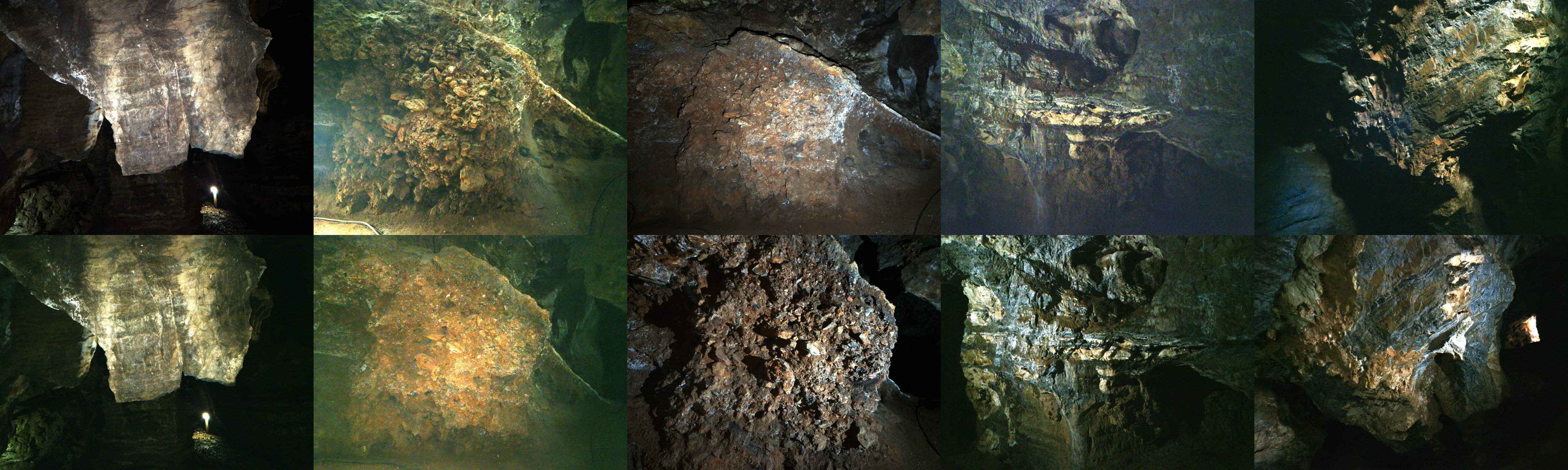
We introduce the challenging Sterkfontein Caves dataset comprising ten underground scenes from a UNESCO World Heritage Site, and use it to find a new simple baseline method that beats existing low-light reconstruction methods upon it. Each scene is of complex surface geometry and high-frequency texture from cave rock structures, including human-made markings on the rock face. The captured images exhibit varied or uncontrolled lighting over a large dynamic range, with glare artefacts, and low signal-to-noise ratios from the challenging dark real-world capture scenario. We propose a view synthesis benchmark for low-light RAW and sRGB reconstruction. All tested NeRF and Gaussian splatting baseline methods struggle on this data, with the best performing method in terms of reliability and average PSNR being our Raw-Nerfacto method. We discuss these errors in detail to find directions of future work for the community in overcoming the significant challenges that remain in low-light high-detail scenes.
Video
Dataset
How to download
The dataset is hosted on Globus, which transfers the whole collection to your computer in one step — you do not download files individually. Pick whichever option suits you; all three copy the full dataset recursively (parallelized, checksum-verified, and resumable if the connection drops). The collection stores each published dataset version in its own frozen directory. Download /0.9/, the current version; earlier releases (/0.1/, /0.2/) remain available so that results scored against them stay reproducible. VERSIONS.txt at the collection root describes every version, and CHANGELOG.md inside each version lists its changes.
Option 1 — Web app (no coding)
- Install Globus Connect Personal (free; Windows, macOS, Linux) to turn your computer into a Globus collection. If your institution already provides a Globus endpoint, you can use that instead.
- Click Download Dataset above and sign in (free — via your institution, Google, or ORCID).
- In the two-panel file manager, set your own computer as the destination, open the
0.9folder (the button above lands there), select everything, and click Transfer.
The dataset’s full documentation (scene table, formats, evaluation protocol, per-scene notes) is the code repository’s README (repository public soon at github.com/brownvc/sterkfontein-nvs); after downloading, python scripts/verify_dataset.py --root /path/to/sterkfontein checks your copy end-to-end against the shipped checksums.
Option 2 — Command line (Globus CLI)
Install with pip install globus-cli, run globus login, then transfer recursively:
globus transfer d5e8d614-aa93-4f3e-84a9-516b6013ed9a:/0.9/ YOUR-ENDPOINT-ID:/sterkfontein/ --recursiveOption 3 — Python (Globus SDK)
Install with pip install globus-sdk, then:
import globus_sdk

SOURCE    = "d5e8d614-aa93-4f3e-84a9-516b6013ed9a"  # Sterkfontein dataset collection
DEST      = "YOUR-ENDPOINT-ID"                       # your Globus Connect Personal collection
CLIENT_ID = "YOUR-CLIENT-ID"                         # register an app at app.globus.org/settings/developers

# One-time login: opens a URL, paste back the code it gives you
auth = globus_sdk.NativeAppAuthClient(CLIENT_ID)
auth.oauth2_start_flow(requested_scopes=globus_sdk.scopes.TransferScopes.all)
print("Log in here:", auth.oauth2_get_authorize_url())
tokens = auth.oauth2_exchange_code_for_tokens(input("Auth code: ").strip())
access_token = tokens.by_resource_server["transfer.api.globus.org"]["access_token"]

tc = globus_sdk.TransferClient(authorizer=globus_sdk.AccessTokenAuthorizer(access_token))

# Recursively transfer the entire dataset
data = globus_sdk.TransferData(tc, SOURCE, DEST, label="Sterkfontein dataset")
data.add_item("/0.9/", "/sterkfontein/", recursive=True)
task = tc.submit_transfer(data)
print("Submitted - track at https://app.globus.org/activity/" + task["task_id"])
Citation
@inproceedings{sterkfontein,
    title     = {The Sterkfontein Caves Dataset: A Novel View Synthesis
                 Challenge from the Cradle of Humankind},
    author    = {Liu, Ireton and Xu, Brian and James, Steven and
                 Stratford, Dominic and Klein, Richard and Tompkin, James},
    booktitle = {Proceedings of the European Conference on Computer Vision (ECCV)},
    year      = {2026}
}